
Experimental Games
- Jan 10
- 9 min read
Updated: Jan 12
I was the Technical Designer for our experimental games, I created all the mechanics for the games as well as worked with Lee (Level Designer) to help integrate the mechanics into the level design.
Flopping Fred
Pre Production
For this game the theme was movements and unconventional controls, We decided on making a game about Fred the Trigger fish who is trying to escape a kitchen and return to the ocean.
For pre production we looked into what we wanted this game to be and look like so we looked for different images and references for the game as well as I looked into what different mechanics that the game would have.

I planned out the games mechanics for the fishes movement and for the controls to be gyro based where the player moves a controller physically to manipulate the fish in the level. I looked into how I could achieve gyro controls through 3rd party plugins or different controllers although looking back I think I could've been more prepared by doing more research into how I can implement this feature. I also worked with lee to understand the different distances the fish movements need to cover and what other mechanics that might be needed for the gameplay.
Development
When I started to create the games mechanics I quickly found issues with trying to get gyro controls working either from plugins not working, controllers not being recognised in the Unreal Engine so after talking it over with the team we decided on changing the controls so that the player has to alternate between 'A' and 'D' to move the fish forward and holding both to Jump. This change meant that the base mechanics and feeling of the game were the same but just a different way of moving. This again probably could have been avoided if I did more research into how gyros and controllers work in unreal.

I also worked on creating the water system which was very simple and I made a death and checkpoint system to keep players progress and to add risk to the game. Around this time is when the level blockout was about 50% done and we needed some additional mechanics and environmental hazards for the player to have to navigate so I came up with created a Roomba Enemy. I had to learn how to create a basic AI that roams around but when it sees the player it chases them, I have very little AI experience and knowledge so I enjoyed learning how to create this simple AI. How the AI sees the player is by using sight perception and determining if the player is a close enough distance for the Roomba to 'see' the player.


Testing and Feedback
When we started testing the game we found that some jumps wasn't possible or too easy so Lee (Level Designer) created exact distances that Fred needed to be able to cover and so I adjusted his movement speeds and also created a way so that Lee can actively tweak those values while testing to make it easier. another thing is some tweaks to water meter values as it cut very close between different refills which I also made so that the values could be changed easily in editor without going through the scripts to speed up development.
There was some feedback on presenting information to the player. There wasn't a clear number in how much water they had or where they were going. To fix this I added a number beside the water meter so not only does the player have a bar but they have a exact number for water, I also added waypoints to the checkpoints so the player is given direction on where to go, I did this using a plugin I own from Fab that is really simple to use all you have to do is attach the Widget Blueprint to the Actor.
Final Features and Polishing
The last of things I worked on was creating a jump boost zone so that when the player enters the zone they gain a boost on their next jump, this just added some extra gameplay and complexity to the platforming, I then added a scripted event where the player jumps on the door handle to open the door.


Other than that I only had to go over and make sure all the mechanics worked smoothly and create a very basic main menu screen for the game, I also added in a last minute timer so the player can track how long it takes them to complete the level and I also added a end game screen for when the player completes the game. I also added some sound effects for Fred's movement and also water refilling.


F - Trials
Pre Production
For this game the theme was game mechanics, We decided on creating a puzzle game where the player has to take over different robots that each have different abilities to solve different puzzle rooms and escape.
For Pre production I looked into different similar games like Portal. Using this to get a better understanding of what different mechanics the game will need. The main mechanic for the game is switching into different robots and gaining their unique abilities. The abilities that I picked for the robots are jumping, crouching and picking up objects. With my own knowledge I decided to use structures to hold the information of abilities and use to determine what abilities the player has.

During discussion with the team we talked about what kind of puzzles we wanted so we decided that it would be mainly pressure pad based where different pads would activate certain things. These pads can be triggered by certain things like the player standing on them or a object placed on them allowing Lee (Level Designer) to mix them to create different complex puzzles.
Development
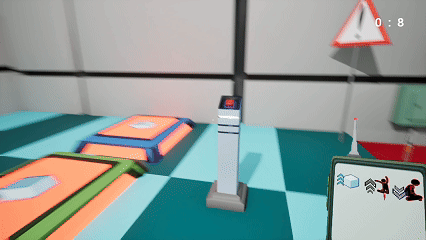
I started with the base mechanic of switching to a robot which was pretty simple, I made it so when an input is detected a line trace is created and gets the robots position and rotation and sets it to the player while deleting the robot, essentially creating the effect of taking over the robot. I then set up so that each robot has a structure that holds the different abilities as bools which I then connected so that the line trace grabs them and sets them in the players' structure before deleting the robot. After that I made it so when you become another robot it quickly creates a robot at the players position and copies their abilities into the robot before changing into the next robot, completing the illusion that you are becoming different robots.

After creating the main mechanic, making sure the player can only do those certain abilities is easy by just checking the specific bools before the action to see if the player can do it. I then started working on the pressure pads that can be activated by the player standing on it or a object placed on it. For picking up objects I had to do some research and found a YouTube video for a simple method. Then I modified the Engines pre built moving platforms and doors so that they only activate when the pressure pad is activated I also made a version of the moving platform that can kill the player.


Testing and Feedback
During testing we found a number of things that had issues first was the player was able to throw the cube out of the world, to fix it I created a death floor so that the cube or player can't leave the puzzle rooms, I also added a spawner so they can get a new cube if they need. Another issue was when the player was becoming the robot, the previous robot spawned in mid air, I looked into it but I wasn't sure what was causing it, my best guess was it was spawning at the middle point of the player because a fix that worked was taking the players half height away from the robots spawn locations and to ensure they go to the ground I added gravity to them.


Final Features and Polishing
The last of the features that I added was some basic UI elements like a main menu, a pause menu and a screen for switching between levels when they were completed, this menu also had a death counter as well as a timer that times how long the player takes to complete the puzzle, from this menu they can either quit to the main menu screen, restart and try again or move on to the next level. I also made the players' pad display which ability the player currently has using images from our artists.

Looking back I definitely think I could've come up with more interesting ways of using the main mechanic by making different abilities like a robot that can climb walls or can glide or something to add more diversity to the game. Compared to Flopping Fred we were way more organised I think its because we found our workflow and how to communicate together during Flopping Fred and was able to apply it fresh to this game.
Why am I here?
Pre Production
This games theme was game narrative structures, we decided to create a game based on drunk driving where you are in a dream state in what looks like a hospital and you have to explore to figure out why.
This is a game that's less mechanically focused then anyone in the team is used to so we already knew we would find it difficult to covey emotions to a player to create a strong narrative game. We looked into different games that achieved a similar goal to understand what kind of mechanics and environment we need to develop, the goal is to make the player confused by being in familiar spaces but a lot of the environment is greyed out almost like they can't remember what it is then towards the end give hints as to what happened and ultimately come full circle with the event itself.
For the mechanics I knew it would be pretty light, I planned to have doors that the player can open and close, some cutscenes to give essential story to the player and items of interest that the player can pick up and inspect. I also came up with the idea to use Level streaming, a recent tool we learned so we can create a endless hallway effect to add confusion to the player.

Development
I started with creating the basic character movement, I wanted to restrict the movement and make it feel a little heavy so didn't add jumping or crouching so the player can only walk, originally we wanted the player to start in a bar and make a choice between drinking water and drinking alcohol implying about drink driving consequences so I made a movement where the player walks up and makes a choice by pressing a side and then that would determine the games ending I also created a door blueprint using models that the artists made.
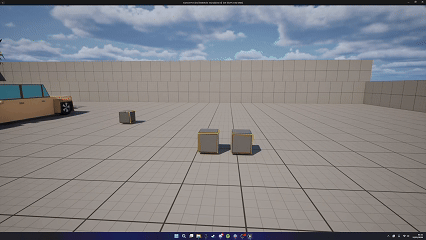

I then created a objective mechanic that gives small hints in the corner of the screen if needed. I also made the inspect item mechanic where the player can pick up the object and inspect it using mouse click and drag. This gave some interactivity in the game, after that I started working on the endless hallway this meant that for the majority of the hospital section would different versions of the same hallway making the player confused, I had an issue where the moment the player gets sent back to the start of the hallway the game has a small jitter where it's noticeable. By this point we changed direction and decided we weren't going to have the bar scene and instead the player would wake up straight in the hospital. So I created an opening cutscene where the player wakes up and added a heart rate monitor in the room so that the player would have an audio hint at what is going on.

Testing and Feedback
During testing we found that most people noticed the transition in the hallway level streaming, I tried a couple of things that helped a little with it but nothing that really resolved it until someone from another team mention a video of a blinking function I could use to hide it and it ended up making the transition perfect.
I also noticed when people were played that the game felt very static when people were walking around so to change that I added a head shake effect to the camera to make the player feel more disoriented.

Final Features and Polishing
When it came to finishing up the game I made sure all the level streaming was working perfectly and that doors would open and close properly, I also made a pause game function so that the player can leave the game. I made the final cutscene that gives context and the big reveal to the player and added a bunch of sfx to fill the environment with life.


Overall I found working on this game harder than the others as I struggled with it being less mechanic focused and more fine tuning the environment into how we want the player to perceive it. I did enjoy working on cutscenes and seeing it add to the story and putting into practice level streaming techniques.

Comments